

Table of Contents
SEED 2026 Registration Ongoing! The Symbiosis Institute of Design (SID) announced the SEED 2026 (B.Des) application form on August 1, 2025. The application is available online at the SID admissions portal, sid.edu.in. The SEED application form 2026 last date to apply is Nov 30, 2025. The commission has also notified the SEED 2026 exam date, i.e., Jan 11, 2026. You can find the SEED registration link 2026 in the sections below to apply directly.
To apply for SEED 2026, visit the link given below. Get registered, create an application account, fill out the necessary information, upload documents, and pay the examination fee. The application fee for SEED 2026 is INR 3250.
Steps to Fill SEED Application Form 2026
The SEED application form consists of various steps like registration, form filling, fee payment and so on. The steps required to fill SEED Application Form 2026 are listed below for your reference.
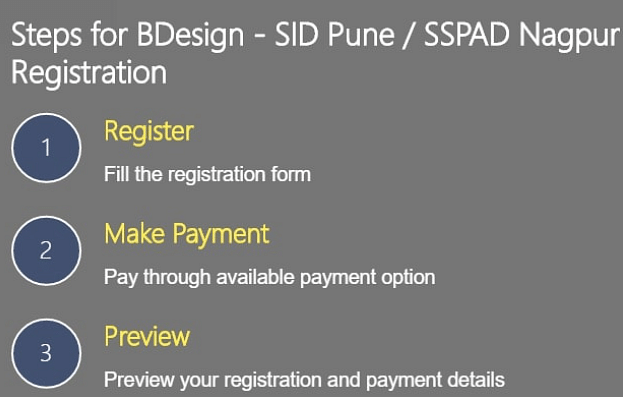
- Step 1: SEED 2026 Registration
The application link must be clicked by you who meet the SEED 2026 eligibility requirements. Click the "New User? Register Now" tab after that. After carefully reading the "Terms and Conditions," choose the "I Agree" checkbox and finish the registration procedure.
- Step 2: SEED 2026 Application Form Filling
Next, complete the SID Exam application form with your contact, personal, professional, and educational information. Additionally, you must submit your most recent passport-sized photo in jpg, png, or gif format, which must not be older than three months. The file should have a size of 10 to 150 kb.
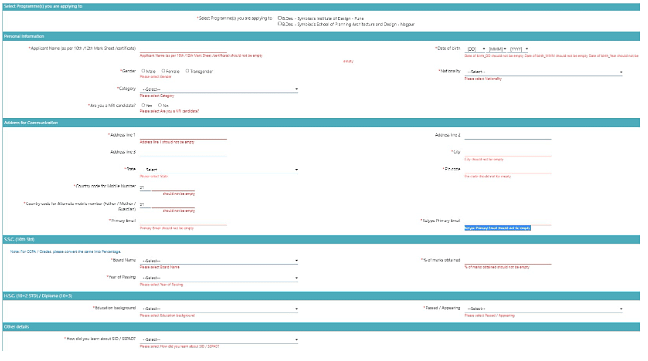
The major fields present in SEED 2026 Application Form are given below.
- Name
- Date of birth
- Gender
- Category
- Mobile number
- Programme/ Discipline preference
- Education background
- Test city preference
- Passport-size photograph.
You need to fill these mandatory fields on SEED Application Form 2026.
- Step 3: SEED 2026 Application Fee Payment
The SEED application fee is INR 3250. The Symbiosis Entrance Test fee can be paid online by candidates. Registration fee is non-transferable and non-refundable.
- Step 4: SEED 2026 Application Form Submission and Printing
You will receive an email confirmation with your application number once you have finished the above steps. Please take note that only the ones who have received this email confirmation will be issued a SEED admit card. Additionally, you must register for admission at the individual Symbiosis International University institutions in which you wish to get admission.
SEED Registration Apply Link 2026
You can find the registration link for SEED 2026 in the table below:
| Particulars | Link |
| SEED Application Form Link 2026 | Direct Link |
SEED 2026 Application Form Dates
You must register, create an application account, provide the required information, submit supporting documentation, and pay the exam fee before they fill out the form. The application fee for SEED 2026 is Rs 3250.
The important dates pertaining to SEED 2026 are tabulated below.
|
SEED Events |
SEED 2026 Important Dates |
|
SEED 2026 Online Registration |
Aug 1- Nov 30, 2025 |
|
SEED 2026 Admit Card |
Jan 5, 2026 |
|
SEED 2026 Mock Test |
Jan 7, 2026 |
|
SEED 2026 Exam |
Jan 11, 2026 |
|
SEED Result Release Date 2026 |
Jan 19, 2026 |
| SEED PRPI Admit Card Date |
March 2026 |
|
SEED Portfolio Uploading Date |
March 2026 |
|
SEED PRPI Phase 1 Exam 2026 |
March 2026 |
|
SEED PRPI Phase 2 Exam 2026 |
April 2026 |
|
SEED Final Merit List Release Date |
April 2026 |
|
SEED Fee Payment and Online Registration Starts |
April 2026 |
|
SEED Commencement of the Program |
July 2026 |
Documents Needed for SEED Application Form 2026
When completing the SEED application form, you must have certain documents on hand. The required documents regarding SEED 2026 is stated below.
- Passport-size photograph in the formats.jpg,.jpeg,.png, or.gif (the size should not be more than 150 kb)
- Birth certificate/Class 10 pass certificate
- Certificate of caste (if applicable)
- HSC marks
- SSC marks
- Photo ID proof.
Note: Your HSC scores (Choose "Appeared" in case you are awaiting results this year).
How to Retrieve Forgotten Password of SEED 2026 Application Form?
If you have lost or forgotten your password then it is very essential for you to retrieve it as fast as possible. You can refer the following steps to retrieve a forgotten password of SEED Application Form 2026.
- Step 1: Click the "Register" button on the official website.
- Step 2: To reset your password, click the 'Forgot Password' link next to the 'Sign in' button.
- Step 3: An additional window will open.
- Step 4: Type in the name, email address, and birthdate.
- Step 5: Select "Submit"
- Step 6: You will receive a message about it.
- Step 7: Reset the password and make a note of it for later use.
SEED Admission Process 2026
The SEED admission procedure consists of different stages. Below is a description of the SEED 2026 admissions procedure in detail.
- Completing the online application.
- Registering taking the online SEED 2026 admission exam.
- Results announcement of SEED 2026.
- Candidate selection for portfolio review and in-person interaction (PRPI).
- Rounds of Personal Interaction and Online Portfolio Review.
- Release of the admissions merit list.
Important Instructions Regarding SEED Application Form 2026
You must keep in mind certain set of instruction. The important instructions are listed below for your reference.
- Check the requirements for eligibility set forth by the conducting authority prior to registering for SEED. Only if you meet the requirements should you apply for the exam.
- As there is no opportunity for modifying the application, you must complete the form accurately on your first attempt.
- Only those of you who successfully pay the application cost and complete all the data are given access to the admission card.
- The application cost is not refundable and cannot be transferred.
- The required passport photo on the application form cannot be more than three months old.
- Follow the institute's established photo guidelines. The same has already been mentioned.
- To minimise the possibility of error, applicants are urged to disable the autofill feature and manually complete all fields.
- The completed application form must be downloaded and printed out by you because it will be needed several times throughout the admissions process.
FAQs on SEED Application Form
Q: What documents are needed for filling SEED 2025 application form?
Q: Where can I fill out the SEED 2025 application form?
Q: When will the SEED 2025 application form open?
Q: What happens if I provide erroneous information in the SEED 2025 application form?