Students can reserve their exam date and time for BITSAT through BITSAT slot booking. Slot booking for session 1 will start on April 2026.
BITSAT slot booking 2026 allows registered candidates to book the test date and time for the BITSAT exam by logging into the official website - www.bitsadmission.com using their application number and date of birth. The slot booking for BITSAT will start in April 2026 for session 1 and from May 2026 for session 2.
You must note that the BITSAT 2026 slot booking will be done on a first-come-first-serve basis, and no modifications will be permitted once the slots are booked. In case a student misses out to reserve a slot for BITSAT within the given deadline, BITS Pilani will assign a test date & time automatically.
BITSAT Slot Booking 2026 Dates and Timings
BITS Pilani slot booking 2026 will be provided by the University to the candidates so that they can select their choice of the test date, BITSAT test centers, and timings as per their requirements. The BITSAT slot booking date 2026 for sessions 1 and 2, along with other important dates, is mentioned in the table below.
| Events | Dates for Session 1 | Dates for Session 2 |
|---|---|---|
| BITSAT Slot Booking 2026 | April 2026 | May 2026 |
| Release of BITSAT Admit Card 2026 | April 2026 | May 2026 |
| BITSAT 2026 exam | Apil 15 - 17 2026 | May 24 - May 26, 2026 |
BITSAT 2026 Slot Timings
There will be two slots for BITSAT 2026. Slot 1 will be held from 9 AM to 12.00 PM, and Slot 2 will be held from 2.00 PM to 5.00 PM.
| Slot 1 | 9 AM to 12.00 PM |
| Slot 2 | 2.00 PM to 5.00 PM |
BITSAT Slot Booking Process 2026
BITSAT slot booking 2026 is for the aspirants to choose between the two slots mentioned above at their convenience. Before choosing the slots, one needs to have a BITSAT application number. We will see a step-by-step guide to the same in the section given below.
Steps for BITSAT 2026 Exam Slot Booking
BITSAT exam 2026 slot booking is a very easy process. It will be held online only. The steps required for the BITSAT slot booking 2026 process are as follows:
- Step 1: Students must visit the BITSAT slot booking official website - www.bitsadmission.com
- Step 2: Next, they must sign in by entering their application number and password.
- Step 3: Then, the candidate has to choose the test date to book the slot. The dates that are marked in green are the ones available so the candidate can choose the preferred date. Once they have chosen the date, they can click on ‘Continue’.
- Step 4: The last step of the slot booking procedure is to select the timings of the BITSAT exam. There are two sessions conducted, one in the morning and the other in the afternoon.
- Step 5: The morning session is conducted between 9:00 AM and 12:00 PM, while the afternoon session is conducted between 2:00 PM and 5:00 PM. Candidates must choose the timing that is convenient for them and click on ‘Confirm Slot Booking.’
- Step 6: Right after clicking on the ‘Confirm Slot Booking’ tab, they will receive a confirmation page with all the details mentioned.
Check This: List of Top BITSAT Coaching Institutes in India
Common Problems in BITSAT Slot Booking 2026
Though the BITSAT slot booking process is simple & straightforward, students might experience some problems. In the sections below, we have discussed the common problems that candidates can face while reserving a slot for BITSAT, along with their solutions.
Forgot BITSAT 2026 Application Number
If candidates forget their application number for BITSAT 2026, they can easily retrieve it by following the instructions.
- Candidates should go to the BITSAT official website: bitsadmission.com
- Next, they must tap on “BITSAT 2026 login”.
- Further, the “Forgot Application Number” option must be clicked.
- Then, a new page will open where candidates need to provide their registered email address, contact no., birth date, and gender.
- Thereafter, the candidates should click on “Submit.”
- Lastly, candidates will receive the BITSAT application number on their registered email address and mobile number.
Forgot BITSAT 2026 Password
Another general issue while booking a slot for BITSAT 2026 can be forgetting the BITSAT password. Candidates can retrieve it conveniently through these steps:
- First, candidates should visit bitsadmission.com, the official BITSAT website.
- Then, the “BITSAT 2026 login” option should be clicked.
- Next, candidates must click on “Forgot Password.”
- Further, candidates must enter their details like BITSAT 2026 application number, mobile no, and registered email address.
- Now, the “Submit” button must be clicked.
- Finally, students will get the BITSAT password on their registered email address and contact number.
BITSAT Account Registration 2026
Candidates can follow the simple steps mentioned below while registering for the BITSAT 2026 account.
- Visit the BITSAT 2026 official website.
- Click on the ‘New Registration’ tab, which will open up a set of instructions.
- Read the instructions carefully and click on 'Ok'.
- Enter your name, date of birth, gender, nationality, mobile phone number, and email address, and fill in the captcha code at the end after re-checking the information typed.
- An application number will be generated which you will have to note down for future reference.
- Once the application number has been generated, login credentials will be sent to your email address and mobile phone number.
BITSAT 2026 Application Form
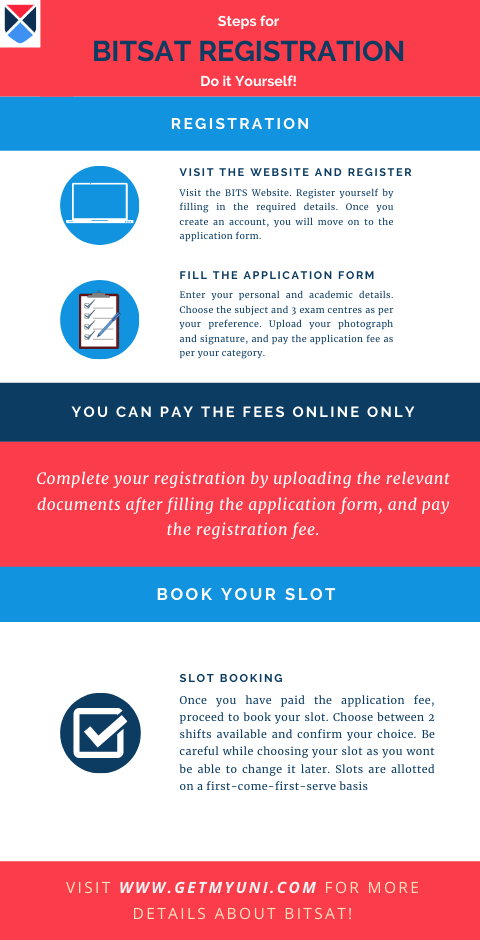
Once the BITSAT application process is complete, candidates can advance towards filling up the application form for the BITSAT 2026. The steps are as follows:
- Upon successful registration, click on "Go to Application" to access the application form.
- Use your login credentials to access the application form.
- If you have forgotten your password for the login, you can click on ‘Forgot Password’, type your user id, and fill in the security captcha provided and you can retrieve your account.
- Mention your personal and academic details.
- Choose the subject of your preference along with 3 of your preferred examination centers.
- Once you have entered all the required details, check all the information and click on 'Submit'.
Upload Your Photograph and Signature
Once the application form has been submitted, the next step is for the applicant to upload scanned copies of their photograph and signature. To upload a photograph and a signature, follow the procedures:
- Use your login credentials to access the portal to upload your documents.
- Select your photograph and signature.
- Preview your photograph and signature and click on 'Upload'.
Application Fee Payment
After uploading the relevant documents, you can now move on to the payment section. Payment will be done through online mode exclusively.
- The application fee for a male candidate is INR 3600, while a female candidate has to pay INR 3100. The fee can ONLY be paid online via net banking or using a debit/credit card.
- Once the payment is successfully made, the candidate is advised to take a printout of the confirmation document for future reference.
BITSAT Test Centres 2026
The BITSAT 2026 is conducted in the following cities:
South and West India
There will be 7 states where BITSAT 2026 will be conducted in South and West India. The states and exam centers are as follows:
| State | Exam City |
| Karnataka | Bangalore, Mangalore |
| Andhra Pradesh | Rajahmundry, Tirupati, Vijayawada, Visakhapatnam |
| Telangana | Hyderabad |
| Kerala | Thiruvananthapuram |
| Tamil Nadu | Chennai, Coimbatore |
| Gujarat | Ahmedabad, Surat |
| Maharashtra | Mumbai, Pune, Nagpur, Nasik |
North and East India
In North and East India, 15 states are assigned as the BITSAT 2026 centers. The states and exam centers are as follows:
| State | Exam City |
| Assam | Guwahati |
| Bihar | Patna |
| Chhattisgarh | Raipur |
| Haryana | Chandigarh, Gurugram |
| Jammu & Kashmir | Jammu |
| Jharkhand | Jamshedpur, Ranchi |
| Madhya Pradesh | Bhopal, Gwalior, Indore |
| Nagaland | Kohima |
| New Delhi | New Delhi |
| Orissa | Bhubaneswar, Roorkee |
| Punjab | Jalandhar |
| Rajasthan | Jaipur, Jodhpur, Pilani, Udaipur |
| Tripura | Agartala |
| Uttar Pradesh | Agra, Allahabad, Ghaziabad, Gorakhpur, Kanpur, Lucknow, Noida |
| West Bengal | Kolkata, Siliguri |
Check This: BITSAT Important Topics - Not To Be Missed
BITSAT Admit Card 2026
The BITSAT Admit card will be available to download once the slot booking process for candidates is done. The steps required to download the BITSAT admit card are as follows:
- Visit the official website for BITSAT 2026.
- Click on the ‘Admit Card’ tab and log in with details of your application number, date of birth, e-mail id, and gender. Click on proceed.
- The Admit card would now be generated on the screen. Take a printout and ensure you have it with you on the test day.
Important Points for BITSAT Slot Booking 2026
Candidates must take note of the following essential points before booking a slot for the BITSAT 2026 examination.
- Candidates must be careful while booking a slot as they will not be able to change their slot allotment once the registration has been done.
- The slots are allotted on a first-come-first-serve basis.
- It is required to reserve a slot through BITSAT slot booking 2026 within the stipulated timeframe.
- Students who don't book their slot in time will be allotted a slot by default.
-
Book your BITSAT 2026 slot on the official website: www.bitsadmission.com. -
Slots are allotted strictly on a first-come-first-serve basis. -
No modifications are permitted once your BITSAT slot is booked. -
If you miss the deadline, BITS Pilani will automatically assign a test date and time.