
The UCEED Exam Application Form 2026 was released on the official website. The application process commenced on October 1, 2025. The last date to apply without fine was October 31, 2025. And the last date with late fine was November 7, 2025.

Table of Contents
UCEED application form 2026 was available online at the official website uceedapp.iitb.ac.in from October 1, 2025. The UCEED registration last date to apply was October 31, 2025 (with regular fee). However, the last date to fill out the online application form with a late fee of INR 500 was November 7, 2025.
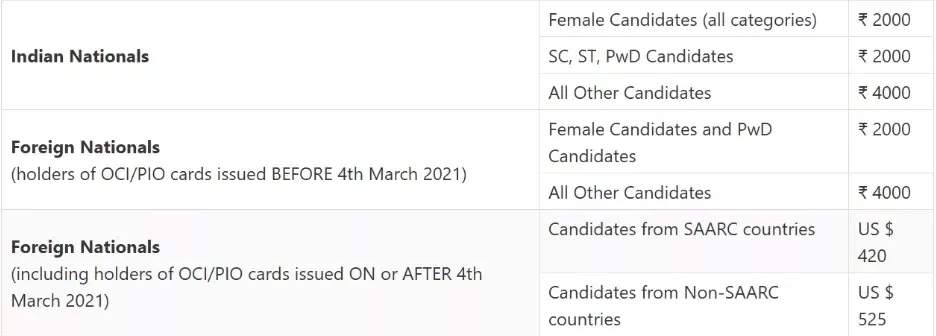
Students were supposed to meet the UCEED exam eligibility criteria to complete the application process. It states that you must have 10+2 from a recognized university. The UCEED exam application fee 2026 for Indian nationals is INR 2000, and for foreign students is US $ 420. The UCEED exam 2026 application direct link has closed now.
UCEED Exam Application Form Key Dates
The important dates related to the UCEED exam application form 2026 have been shared below.
|
Events |
Dates |
|
UCEED 2026 Application Starting Date |
October 1, 2025 |
|
UCEED 2026 Last Date to Apply |
October 31, 2025 |
|
UCEED 2026 Last Date to Apply (with late fine) |
November 7, 2025 |
|
UCEED 2026 Application Correction Window |
November 2025 |
UCEED Exam Registration Process 2026
The step by step process to complete the UCEED exam registration 2026 has been shared below for your reference. You are advised to go through the steps carefully to complete the registration process.
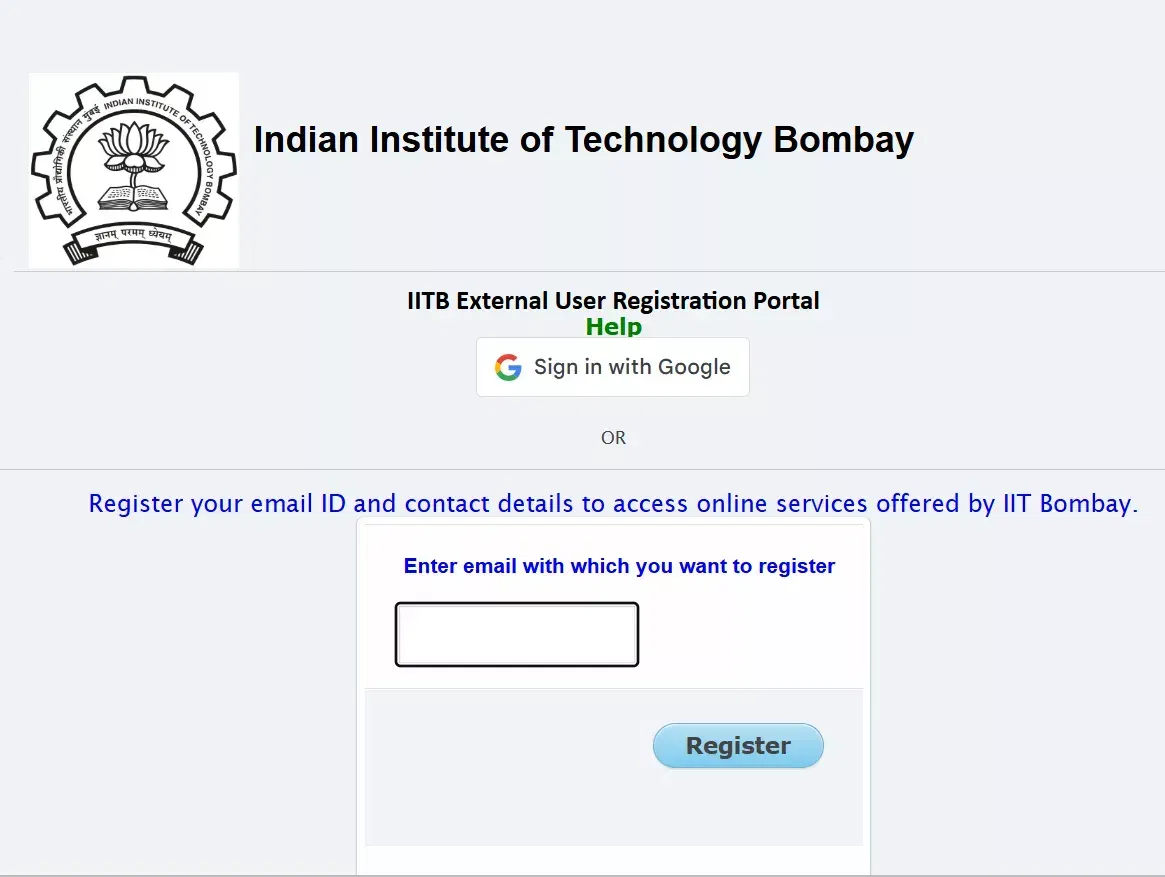
UCEED Application Step 1: Register Yourself
- Visit the official website and click on the “Registration Portal” option on the homepage.
- Scroll down and click on the “Login” option.
- Enter your Email ID and Password and click on ‘Login.’
- The application form will open in a new window.
UCEED Application Step 2: Fill Out the Application Form
- Enter all the information as required.
- Upload the scanned documents that are asked.
- Select your UCEED test locations.
- Now, submit your application form.
UCEED Application Step 3: Make the Payment
- Click on the next folder and open the payment folder.
- Select the payment method options available on the screen.
- Make the payment and submit it.
UCEED Application Step 4: Accept the Declaration Form
- After you have completed all the steps now accept the declaration form.
- Click ‘Submit’ and your UCEED 2026 application form will be submitted.
- Download and take a printout of it.
UCEED 2026 Application Form Link
The direct link to apply has been closed now.
| Particulars | Link |
| UCEED 2025 Registration Form Link | Closed |
Also Read:
UCEED Exam Application Form Fee 2026
The UCEED exam application fee is different for all the categories. You must check the category wise and nation wise UCEED registration fee and pay the respective amount.
Documents Required to Fill UCEED Exam Registration Form 2026
You must make sure to provide all the documents that are required to complete the application form.
- Recent Colour Photograph
- Full Signature
- Qualifying Examination Certificate
- Proof of Date of Birth
- Gazette notification showing the change of name (If the name is not the same as in the Class XII certificate)
- Provisional Certificate
- Category Certificate
- Disability Certificate
UCEED Document Specification
The document that will be uploaded must be within the specification mentioned by the conducting authority.
|
Document |
File Size (in KB) |
Format |
|
Class 12th mark sheet |
Less than 500 |
|
|
Caste Certificate (OBC-NC/SC/ST) |
Less than 500 |
|
|
PwD Certificate |
Less than 500 |
|
|
Age Proof Certificate |
Less than 500 |
|
|
Nationality Certificate |
Less than 500 |
|
UCEED Photo Signature Guidelines
There are certain rules and guidelines to be followed for the images to be uploaded.
|
Documents |
File Format |
File Size |
|
Recent colour photograph |
|
Minimum Size: 5 KBMaximum Size: 100 KB |
|
Signature |
|
Minimum Size: 2 KBMaximum Size: 50 KB |
|
Qualifying examination certificate (Class 12 mark sheet) |
PDF format with file extension .pdf |
Minimum Size: 30 KBMaximum Size: 500 KB |
|
Provisional certificate |
Minimum Size: 30 KBMaximum Size: 300 KB |
|
|
Gazette notification showing the change of name(If the name is not the same as in the Class 12 certificate) |
Minimum Size: 30KBMaximum Size: 300 KB |
|
|
Category certificate issued by the competent authority |
Minimum Size: 30 KBMaximum Size: 300 KB |
|
|
Request letter (for PwD candidates requiring scribe and/or compensatory time) |
Minimum Size: 30 KBMaximum Size: 300 KB |
How to Retrieve UCEED Login Credentials?
In case if you have forgotten your UCEED exam login details then you can follow the steps shared below.
- Check You Registered Mobile Number- UCEED conducting authority sends the registration number and password to every candidate’s registered mobile number and email ID. Thus scroll down to the previous messages and you can find the details from there.
- Attempt Forgot Password- You can also click on ‘Forgot Password’ option and create a new one. Use your newly created password to login.
- Reach Out to the Officials- In case if none of the above steps work, then you must reach out to the officials. The email ID and phone number of the conducting authority is shared on the official website and has also been mentioned below for your convenience.
UCEED Contacts
Conclusion
The UCEED application form 2026 is the first step towards taking the exam. It is your entry ticket that registers you as a candidate. You must be very careful while filling out the UCEED application form as the same details will reflect on your admit card, result, and scorecard as well.













POST YOUR COMMENT