
CBSE migration certificate is provided to all the students who passes the CBSE 10th and CBSE 12th examinations. It is essential for pursuing higher education, employment, or admission to other institutions. This article covers more information about the same.

Table of Contents
- CBSE Migration Certificate 2026: Application Form Link
- Steps to download the CBSE Migration Certificate from Digilocker
- How to Get a Duplicate CBSE Class 12th Migration Certificate Offline?
- How to Fill the Migration Certificate CBSE Application Form?
- Important Points to Remember for the CBSE Migration Certificate
The Central Board of Secondary Education (CBSE) issues the migration certificate for students who have cleared their class 10/12 exams. Students can get their migration certificate from the official portal, cbse.nic.in, and DigiLocker. The migration certificate is important for higher studies, jobs, and other future endeavours.
Students unable to obtain the required passing marks in their board exams can appear for the CBSE supplementary exams for class 10th and 12th and then apply for a migration certificate. This article covers all the important information regarding how to get a migration certificate from CBSE, including the link to download, steps to check, and more.
CBSE Migration Certificate 2026: Application Form Link
Students need to enter their login credentials, such as class, roll number, candidate's name, father's name, passing year, etc. Students can also download the PDF file of the CBSE migration certificate application form 2026. They can obtain their migration certificate CBSE 2026 using the link tabulated below.
| Particulars | Details |
| CBSE Board Migration Certificate Direct Link | Click Here |
| CBSE Board Migration Certificate Application Form | Download |
Steps to download the CBSE Migration Certificate from Digilocker
Students can use Digilocker to store their mark sheets, certificates, and migration records. The DigiLocker initiative is a free-of-cost service to save documents online. Hence, if someone loses their original certificates, they can register for the CBSE DigiLocker service to receive digital format certificates immediately.
Students can follow the instructions below for the CBSE Migration Certificate online download from Digilocker.
- Step 1: Students must visit the official website of the DigiLocker at cbse.digitallocker.gov.in or download the app from the Play Store or App Store.
- Step 2: They can log in with a valid phone number registered with the CBSE board.
- Step 3: Students must use the OTP received on the registered mobile number to log in to the DigiLocker account.
- Step 4: They must ensure that they use their mobile number when filling out the CBSE application form. They can also access their DigiLocker account through their Aadhaar Card number.
- Step 5: After entering the OTP, the system will ask for a security pin. Students must enter the last six digits of the CBSE roll number available on the admit card.
- Step 6: Students can now access and download their CBSE 12th Board Exams 2026/ CBSE 10th Board Exams 2026 migration certificate online from a list of documents on the dashboard.
Also Read: CBSE Roll Number Finder 2026 for Class 10th & 12th
How to Get a Duplicate CBSE Class 12th Migration Certificate Offline?
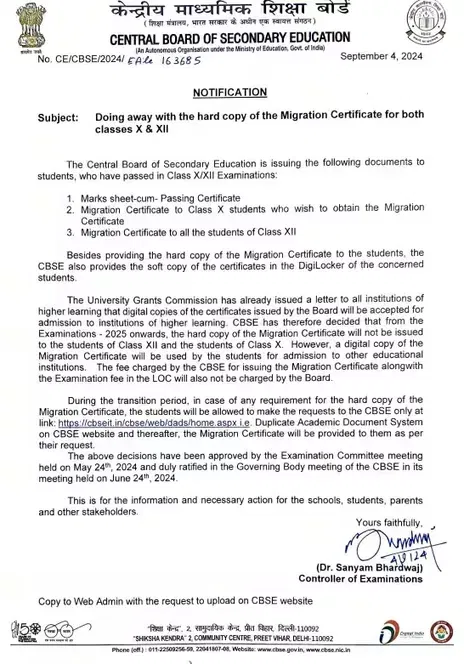
Previously, the CBSE Board migration certificates were accessible in both hard copy and soft copy. The CBSE board used to send applications via Speed Post/Regd offline.
CBSE board doesn't issue the hard copies of CBSE migration certificates. Students can access the Duplicate Academic Document System (DADS) from the CBSE Board's official website during a transitional period.
Why was the CBSE Board Migration Certificate Hard Copy Discontinued?
The CBSE Migration Certificate hard copy has been discontinued by the board due to the University Grants Commission's decision to accept digital copies from the previous academic year. The CBSE board will also not charge the exam fee in the LOC or the fee for granting a migration certificate.
Also Read: CBSE Grading System 2026 for Class 10th and 12th
How to Fill the Migration Certificate CBSE Application Form?
Students can fill in the necessary information, such as their name, parents' names, subjects, address, and other required details, in the CBSE migration certificate 2026 application form. They must provide the correct information to get approval for the migration certificate.
Note: The instructional organisation requests mark sheets, transfer certificates, migration certificates, and character certificates during the affirmation hour. These records ought to have the mark of the school's principal. If the students are still in school, since they need to move to another city and get admission to that school (another board), at that point, they will require an exchange and migration certificate from the school authority.
Also Read: Benefits of CBSE Curriculum
Important Points to Remember for the CBSE Migration Certificate
Students can request a duplicate certificate if they have misplaced their migration certificate from CBSE. The board also uploads the students’ documents and certificates to their Digilocker account.
- Every student registering for the service will obtain all certificates in digital file format.
- They can print a digitally validated certificate and submit it as an original certificate. It is also a legally valid document under the IT Act of 2000.
- Someone who has lost their original migration certificate issued by the regional or head office can also register for the DigiLocker service.
- CBSE officials will upload all certificates into the student's account, including mark sheets, date of birth certificates, provisional certificates, and statements of marks.
A migration certificate is a school/college/university report used to get admission into various institutes. However, the school authorities provide the CBSE migration certificate 2026 alongside essential records (like mark sheets, transfer certificates, and character certificates). These reports assist students with getting accepted anywhere in the nation without complaints.










POST YOUR COMMENT
Showing 1 Comments
Kusum
Apr 6, 2023
how to get my migration certificate sir
Reply