Learn how to download CBSE certificates from the DigiLocker application hassle-free. Follow simple steps for registered and non-registered mobile numbers. Access certificates conveniently on mobile devices.
DigiLocker CBSE is a government initiative under the Ministry of Electronics and IT. It seeks to empower people digitally by supplying citizens with digital documents with realism. For eliminating physical copies, DigiLocker CBSE is a platform for the issuance and verification of documents and certificates in a digital format.
CBSE students can view or download their certificates and mark sheets from DigiLocker, and authorities will accept them anywhere in the country. They need to sync their Aadhaar Card or UIDAI number to their account to use the services of DigiLocker.
How to Download CBSE Certificates from DigiLocker?
Candidates can access their CBSE 10th result and CBSE 12th result mark sheets using DigiLocker. The certificate from DigiLocker CBSE is entirely valid when used online as a soft copy, the ways to download the CBSE certificates are given below. Soft copies of documents are accepted everywhere and can be accessed from DigiLocker CBSE.
How to Download from DigiLocker When Your Mobile Number Is Registered with CBSE?
Here is the step-by-step procedure to download the CBSE certificates from DigiLocker if your mobile number is registered with CBSE:
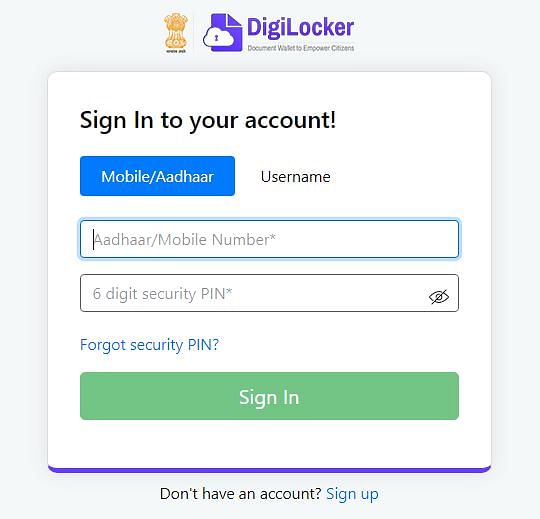
- Step 1: Visit DigiLocker's official website - digilocker.gov.in, or click here. Then sign in with your Aadhaar card number or username and password.
- Step 2: The dashboard will appear on the screen. Click on the "latest notification" on the right side of the page.
- Step 3: Click on "Looking For Your CBSE Digital Marksheet."
- Step 4: Sync your Aadhaar card with the account.
- Step 5: You can view or download the mark sheet.
How to Download from DigiLocker When Your Mobile Number Is Not Registered with CBSE?
Follow the steps given below to download your CBSE certificate if your mobile number is not registered with CBSE:
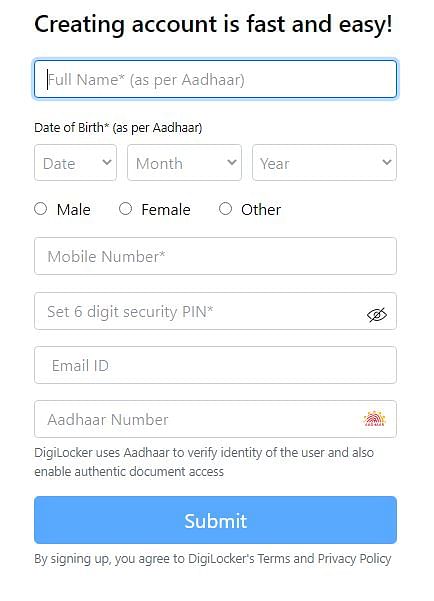
- Step 1: Go to the DigiLocker CBSE mark sheet website or click here and you can sign up or enter your phone number.
- Step 2: Fill in the required details, i.e., full name (as per Aadhar), date of birth, gender, mobile number, set 6-digit security pin, email ID (if available, and Aadhar number (if available), and submit it.
- Step 3: After submitting the details, you will receive a 6-digit OTP to complete the verification. Enter the OTP and submit.
- Step 4: After entering the OTP, set your username and submit.
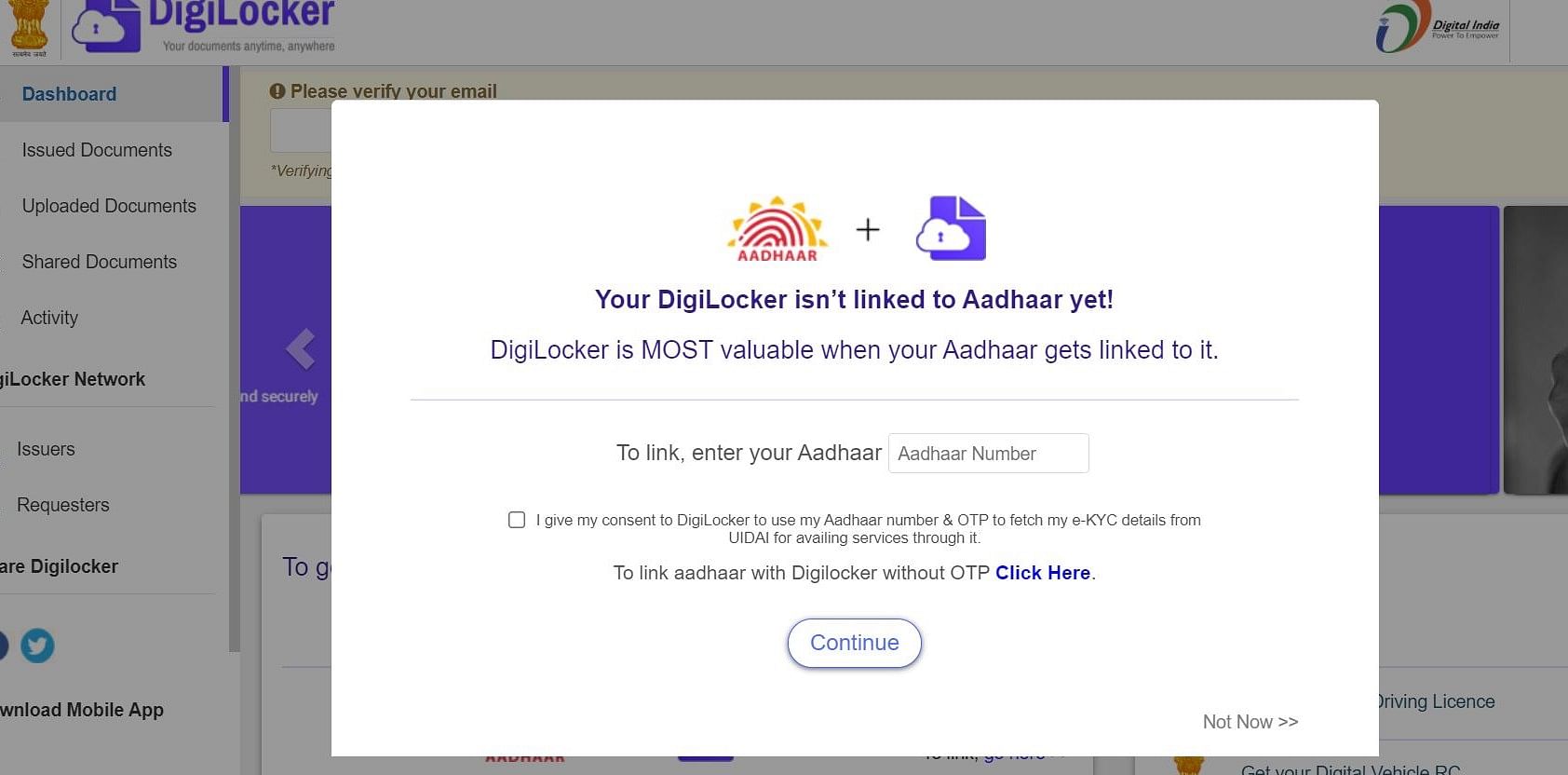
- Step 5: You can also link Aadhaar without receiving the OTP shown below.
- Step 6: The dashboard will appear on the screen. Scroll down a bit and click on "Get Issued Documents."
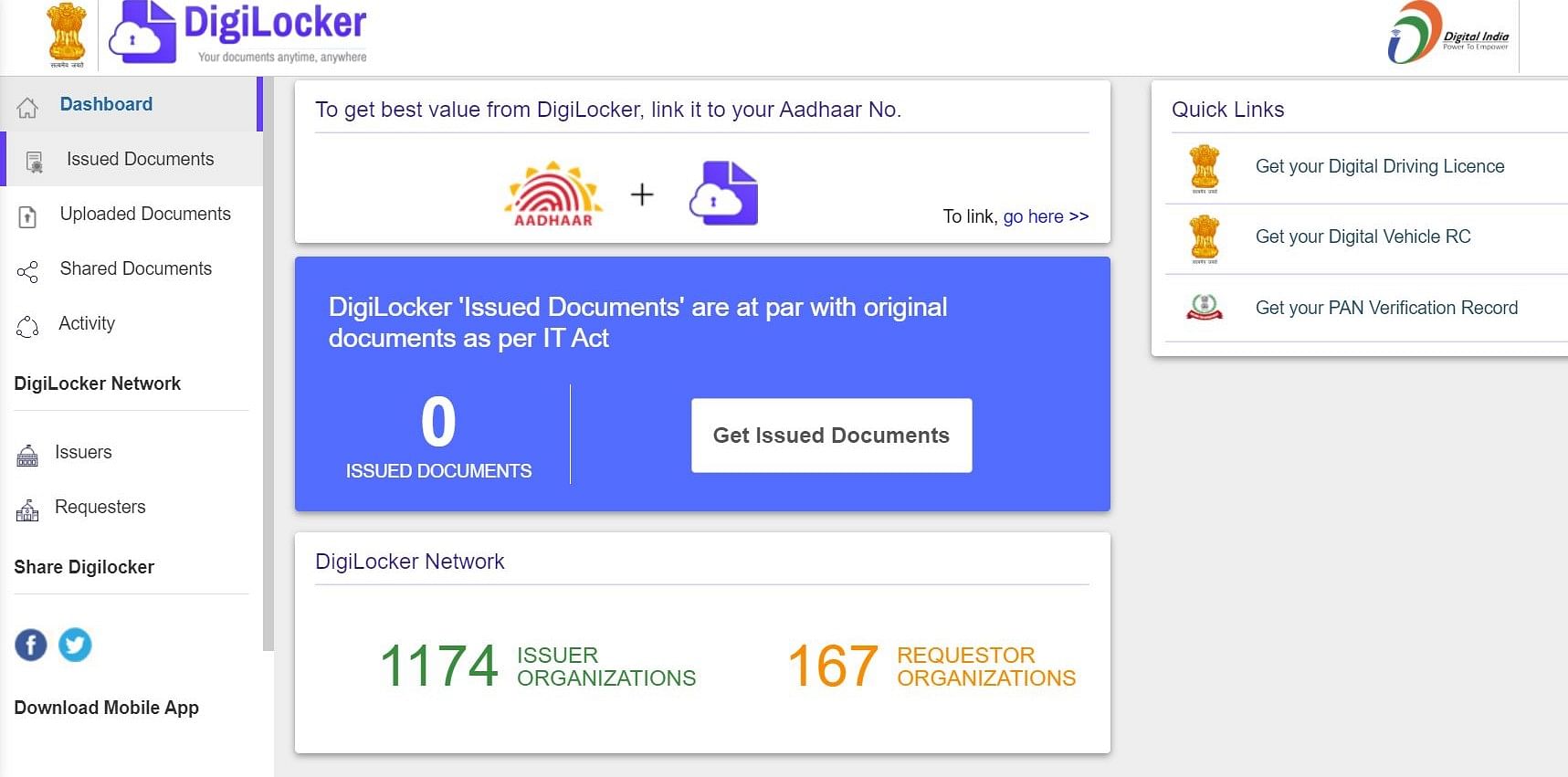
- Step 7: After clicking on that, under the central government section, click on the "Central Board of Secondary Education."
- Step 8: Select the class 10th passing certificate, class 10th mark sheet, class 10th migration certificate for 10th class students, class 12th passing certificate or class 12th mark sheet, or class 12th migration certificate for class 12th class as per requirement.
- Step 9: Check your details, enter your passing year and roll number, and press "Get Document." The document will be saved automatically in the "Issued Documents" section.
- Step 10: You can view or download the mark sheet.
How to Download the DigiLocker App on IOS or Android?
DigiLocker is a digital document wallet for users to store their important documents digitally. DigiLocker CBSE works for both Android and iOS users. Here's how you can do it:
- Go to the Google Play Store or the App Store on your iOS or Android device.
- Type DigiLocker in the search section and tap on it once it appears.
- Tap on Install, and DigiLocker will download it to your device.
Ways to Access Class 10th and 12th Mark Sheet and Certificates Via DigiLocker Website
DigiLocker CBSE has developed student accounts using mobile numbers shared with CBSE. Follow these steps to access the mark sheets of CBSE from DigiLocker:
- Step 1: Visit DigiLocker's official website - www.digilocker.gov.in
- Step 2: Go down to the "Education" section of the website.
- Step 3: Select the "Central Board of Education" option.
Students can scroll down and click on CBSE to view or download any certificate under CBSE.
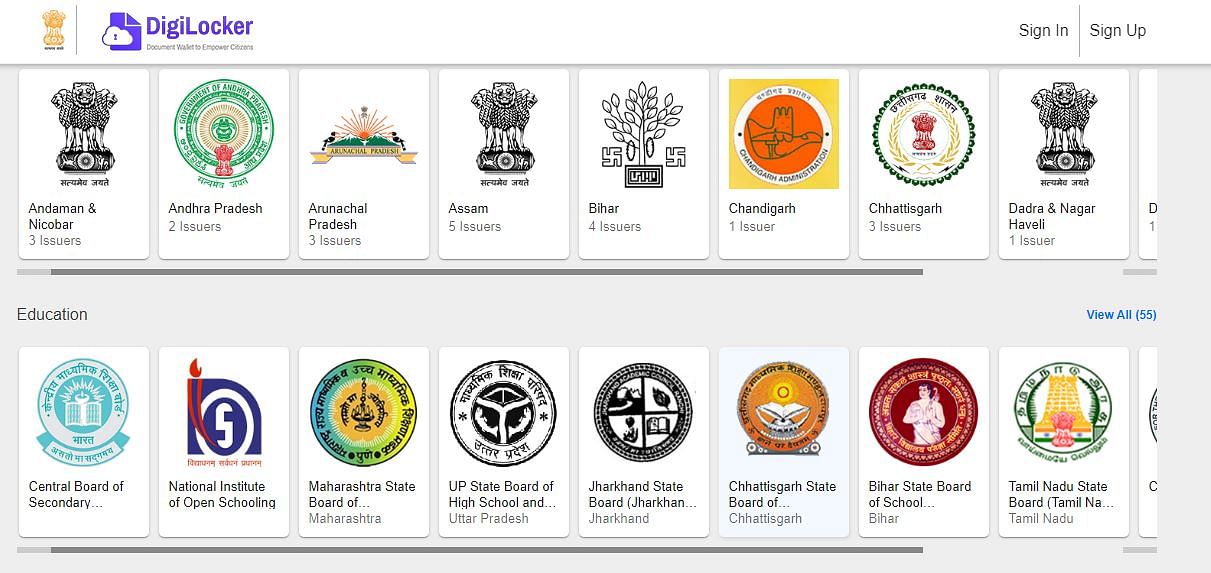
- Step 4: After clicking on CBSE, you will see various documents to view or download by clicking on them.
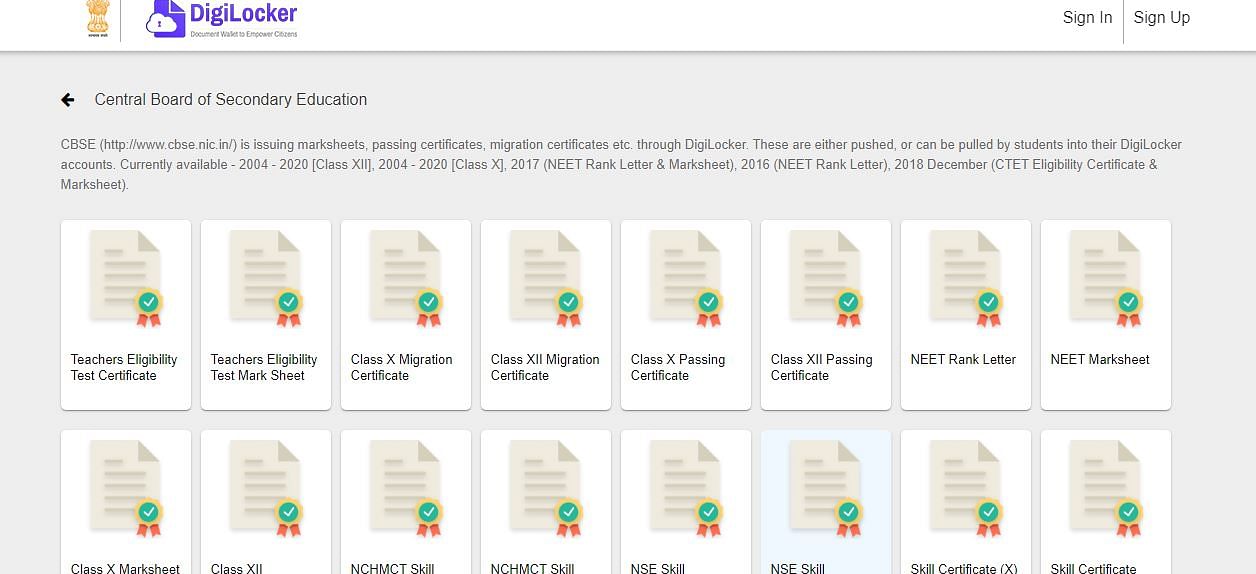
- Step 5: Sign in with your Aadhaar card number and 6-digit security pin or username and 6-digit security pin.
- Step 6: You will receive an OTP to your registered mobile number. Enter the OTP and click on "Submit."
- Step 7: The dashboard will appear on the screen. Scroll down and click on the "Get Issued Documents" button.
- Step 8: After clicking on that under the central government section, click on the "Central Board of Secondary Education."
- Step 9: Select the class 10th passing certificate, mark sheet, migration certificate for 10th class students, class 12th passing certificate or class 12th mark sheet, or class 12th migration certificate for class 12th class as per requirement.
- Step 10: Check your details, enter your passing year and roll number, and press "Get Document." The document will be saved automatically in the Issued Documents section, which is available on the left side of your screen
- Step 11: You can view or download the mark sheet.
Note:
- Students who cannot create their DigiLocker account for other reasons have to Sign up and link their Aadhaar number to DigiLocker.
- Aadhaar can be linked by entering demographic data like Aadhaar number, Name, DoB, and Gender as per Aadhaar if they cannot do Aadhaar-OTP verifications.
Note:
Install the DigiLocker application using the link below.
Click here to install the DigiLocker mobile application.
Benefits of Keeping Marksheet in DigiLocker CBSE
- Ease of Access: With mark sheets stored digitally in DigiLocker, students can access them anytime, anywhere, using their smartphones or computers. There's no need to carry physical copies, reducing the risk of loss or damage.
- Paperless Solution: DigiLocker promotes a paperless environment by eliminating the need for physical mark sheets. This contributes to conservation efforts by reducing paper consumption and environmental impact.
- Validity and Acceptance: Digital mark sheets issued through DigiLocker CBSE are legally valid and widely accepted across the country. They hold the same authenticity as physical documents and can be presented for various purposes, including academic admissions and job applications.
- Security and Data Integrity: DigiLocker employs robust security measures to safeguard digital documents. Data encryption and authentication protocols ensure that mark sheets stored in DigiLocker are secure from unauthorized access or tampering. This ensures the integrity and authenticity of the documents.
- Convenience for Verification: Institutions and employers can easily verify the authenticity of digital mark sheets stored in DigiLocker CBSE through online verification mechanisms. This streamlines the verification process and reduces the administrative burden on both students and institutions.
- Lifetime Access: Digital mark sheets stored in DigiLocker remain accessible to students throughout their lifetime. There's no risk of misplacement or deterioration over time, ensuring that students have access to their academic records whenever needed, even after years of graduation.







![Motilal Nehru National Institute of Technology, [MNNIT] Allahabad](https://media.getmyuni.com/azure/college-image/small/motilal-nehru-national-institute-of-technology-mnnit-allahabad.webp)